
The terminology for searching in Pimberly is wrong. The button that is labeled as 'case-sensitive' is incorrect for the function that it performs. Extremely confusing UI.
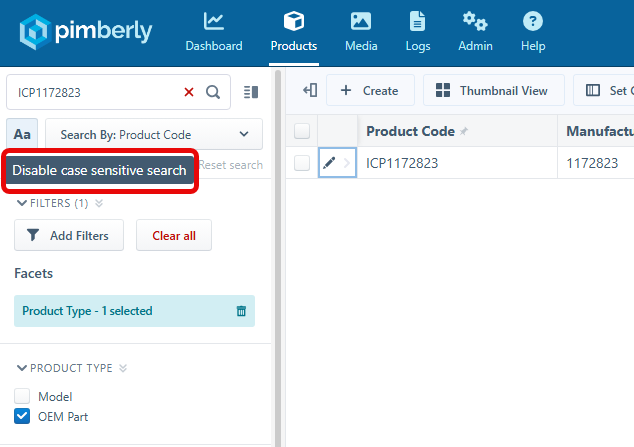
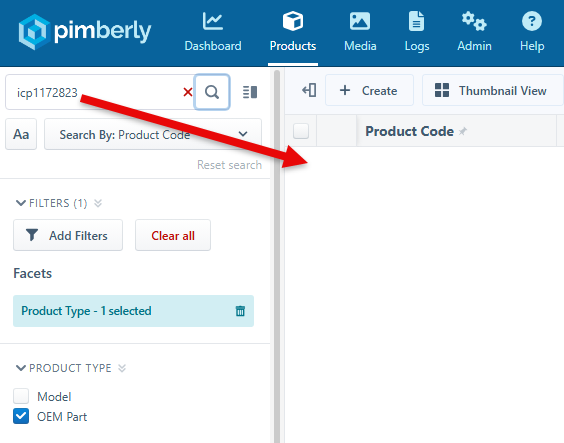
It is not a case-sensitive option. Rather, it's an exact or not-exact function (which it still does not work correctly when disabled). Case-sensitive is defined as: "distinguishing between upper-case and lower-case letters." That is not what this function is doing. If that was the case, then this search should return a result as case-sensitive search is turned off:
It is a simple change to replace the "Aa" button text with something like "=" that will make it intuitively understood. Especially for customers new to Pimberly. You can then update the tooltip text to be "Enable exact match search" and "Disable exact match search".
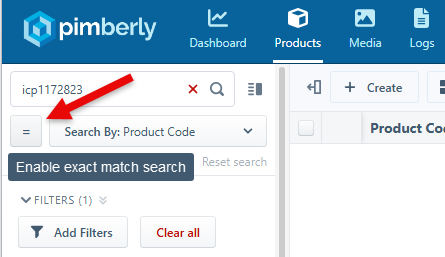
This along with truly making it an exact or not-exact (starts with, contains, etc) search will help users work in the interface efficiently.
Comments
Please sign in to leave a comment.
Hi Jim
I hope you had a great weekend!
The support team have reached out regarding the above!
Best,
Jessica