
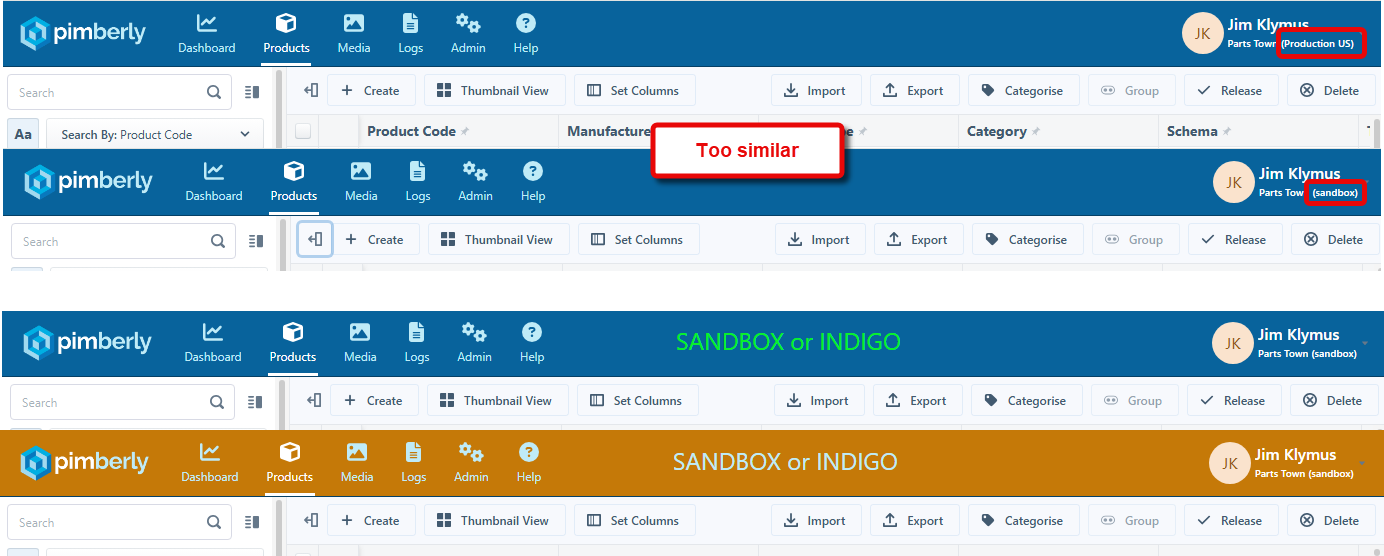
I often have to work in sandbox (Indigo) to test and evaluate and also have the production environment open. Too many times I almost committed something in production that was meant for sandbox. The small text to the right is not easy to spot, as most of the time your eyes are focused at the top and left/middle of a screen. It is an easy change to make the identification of environments clear via a simple element insertion and stylesheet addition. Using a label along the top (either SANDBOX or INDIGO) in conjunction with a banner color change. Both would be best as this covers people who may have trouble distinguishing color differences. This is especially important with new customers who are moving back-and-forth between environments as they learn about the Pimberly application.
Comments
Please sign in to leave a comment.
Hey Jim! David from the support team here. I saw your comment in the suggestion for dark mode about using Stylus to override Pimberly's default styling, so you may already be a step ahead of me, but I wanted to let you know that this would also work to change the banner colour depending on environment.
It's something I've had turned on for a few months now, and I haven't come across any issues with it... but as you rightly pointed out on the dark mode post, we on the support team can't provide any formal support for this so if it does cause issues you'll need to disable it first.
This is my style, which makes the banner in Sandbox a delightful shade of purple:
/* ==UserStyle==
@name           Pimberly Sandbox banner colour override
@namespace      github.com/openstyles/stylus
@version        1.0.0
@description    A userstyle that changes the colour of the banner in Pimberly Sandbox
@author         David Allardyce
==/UserStyle== */

@-moz-document domain("sandbox-indigo.pimberly.com") {
    .ub-bg_480rx4 {
        background: rgb(156, 8, 131);
    }
}
You can of course modify those RGB values as required if you fancy something different. I won't be offended 😄
Thanks! Yes, I actually did change mine a while back.
I went the route to make sandbox look like...well...sand. What else would one make it?! ;-)