
I had a number of back-and-forth emails with a user about them not being able to reset their password. The reset process allowed them to enter their email and the user expected the email notification for resetting. They never received an email. Tried more than once.
Spent too much time trying to figure this out and ultimately had to enter a support ticket. It turns out that the user has not logged in for more than 6 months. Seems that in Pimberly, accounts can become "dormant" if not active for 6 or more months. That is not noted in PIM nor the online support documentation.
Put in logic to where a password reset will check the user email, validate, and if a match display a message that their account is locked and to contact their PIM admin. This will let the user clearly know their account status and what to do next.
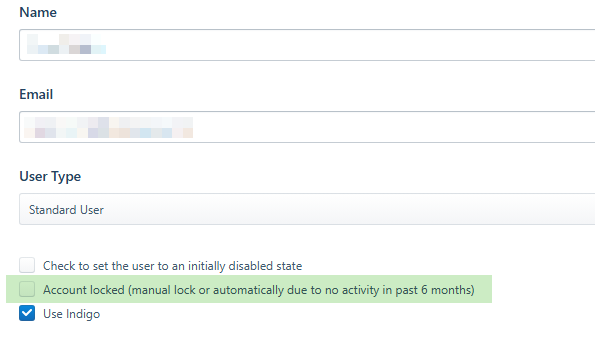
Add in a locked attribute to the Users section so that admins can lock an account (i.e., if someone will be out for extended periods, or want to lock ex-employees as a way to show they once had system access). This will also be set automatically by the PIM for accounts that are not active for 6 months. Unchecking the locked attribute will release the lock and the user can reset their password.
We should be able to manage the PIM and our users without the need for a support ticket to unlock accounts.
Comments
Please sign in to leave a comment.
I agree we have had a few where we have to contact Pimberley support for resolution. While I do appreciate the speed of which the team reply, we should have the ability to unlock users account and even trigger a password reset to our users when needed without the need to log a ticket.